
About create your Microsoft 365 events from Notion
Notion → Microsoft 365 Calendar Sync
Your Notion tasks and deadlines become events in your Microsoft 365 calendar, without double entry.
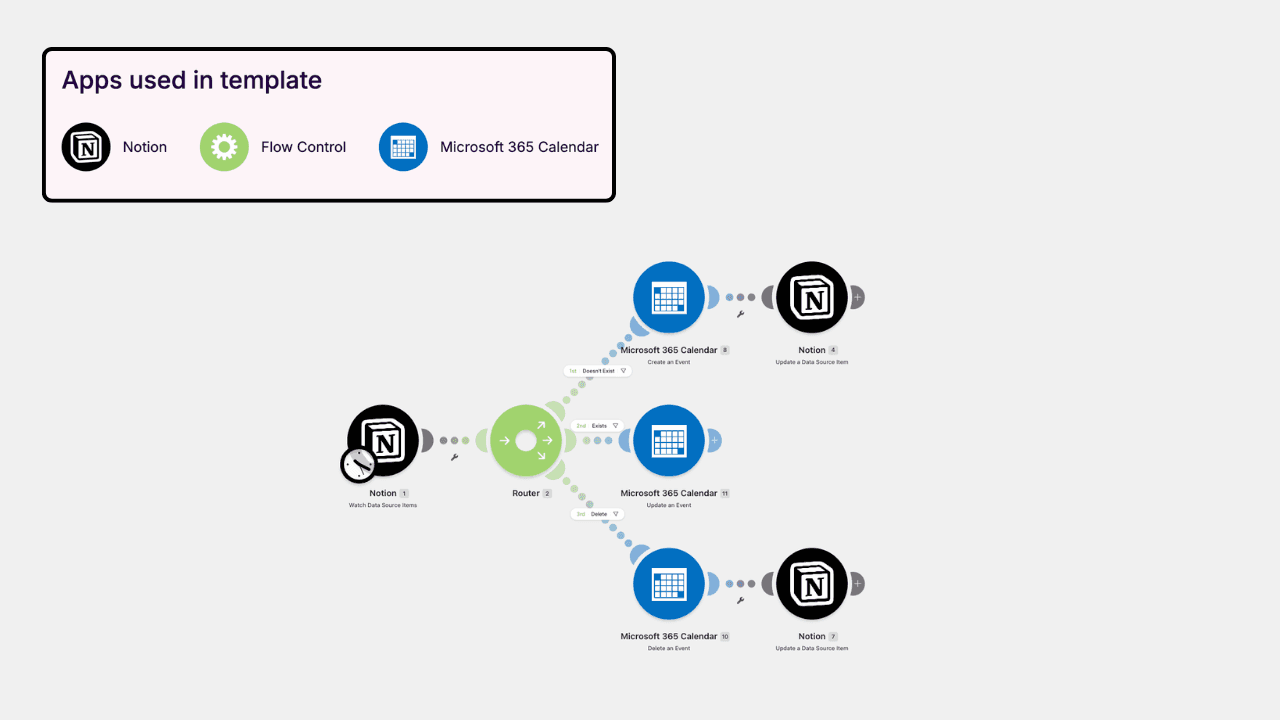
The scenario monitors your Notion base and, as soon as an item is created or modified, creates the corresponding event in Microsoft 365 Calendar. Title, date, time and description are automatically included. A router handles all three scenarios: creating a new event, updating when you move a date in Notion, deleting when the element disappears. The event identifier is rewritten in Notion, which keeps the two tools aligned over time.
Concretely: you plan in Notion, where your projects and notes are already located, and your Outlook calendar remains the one that your colleagues consult and send you reminders.
What's included?
Ready-to-use AI agent connected to Notion
Step-by-step setup guide
Lifetime access and free updates
Email support
Specs
Platform
Notion
Type
AI Agent
Page Count
N/A
Number of Databases
N/A
Support
24/7
Access
Lifetime
Updates
Included
Device Compatibility
Desktop, Notebook, Tablet, Phone
Testimonials





Create your Microsoft 365 events
Your Notion items appear as Microsoft 365 Calendar events, automatically.


FAQ
What is Notion?
Is Notion available on smartphones?
I don't have a paid account, does this still work?
Who can use Notion Systems?
What is Notion system?